Tuning Stripe Radar: Notes from taking over a customer's fraud detection system
Overview
At MouseCat we build AI fraud analysts that flag transactions, review cases, and tune Radar rules. We work with companies from start-ups to Fortune 500 enterprises like Coinbase. In October we took over the Stripe Radar rules from a previous vendor for a smaller customer, a consumer app where users fund a wallet by card. We’ll call them WalletCo. Many of the changes we made apply to anyone taking card payments on Stripe so thought I’d share them here.
Sections:
- Section 1 - Stripe Radar Overview
- Section 2 - Disputes and Penalties
- Section 3 - Preventing Disputes
- [Skip here if already familiar with Stripe Radar] Section 4 - Evaluating Dispute Prevention Controls / Rules
- Section 5 - Recommendations for Stripe Users
- Section 6 - MouseCat
Section 1 - Stripe Radar overview
Radar is the fraud system inside Stripe payments. When a customer submits a payment, Stripe runs it through Radar before sending it to the customer’s bank (the issuer) for approval. Radar scores the payment with Stripe’s models and then, based on the scores and your rules, does one of four things:
- Blocks it so the issuer never sees it
- Requests 3D Secure (note: 3D Secure (3DS) is an extra verification step run by the customer’s bank, usually a code sent to their phone or a tap in their banking app. If the customer completes it, liability for a later fraud dispute on that payment usually moves from you to the bank.)
- Lets it through and flags it for your team to look at afterward
- Lets it through.
Radar comes in tiers.
- Radar Lite is free with standard Stripe pricing and it blocks the payments Stripe’s model rates as highest risk. You cannot see scores or write rules.
- Radar Plus shows you Stripe’s scores for every payment, lets you write custom rules, backtest custom rules against your payment history before turning them on, and gives you a review queue. It starts at $14 a month, or a per-screened-transaction fee if you pay as you go. If you were on Radar for Fraud Teams, Stripe moved you to Plus on July 29, 2026 and bills you under the new pricing from January 22, 2027.
- Radar Pro adds dynamic risk thresholds (explained below) and signals for abuse such as free-trial farming and bots.
Section 2 - Disputes and penalties
Card networks incentivize you, the merchant, to avoid disputes. A dispute starts when a cardholder tells their bank they did not make or do not recognize a charge. If the bank accepts the claim, it files a chargeback through the card network, and the network pulls the money back from you with an additional fee. Stripe shows each chargeback in your dashboard as a dispute.
You get charged a fee for every dispute – even if you fight it and win – and the card networks track your dispute rate. They count your disputes every month, divide by your payment count, and if the ratio is too high they place you in a monitoring program with monthly fines. Eventually, they will stop you from accepting their cards at all. Stripe treats dispute activity above 0.75% as excessive and reaches out to warn you. Visa’s current program (VAMP) counts disputes plus early fraud warnings, divides by captured payments, flags you at 0.5% and fines you at 1.5%. Mastercard’s program starts at 100 chargebacks and a 1.5% rate.
It can be tricky to balance dispute risk with allowing payments from good users. As you allow higher-risk payments, it allows more good customers to pay, but more fraud gets through and your dispute rate goes up.
Section 3 - Preventing disputes
To prevent disputes, Stripe provides two useful tools:
- Scores - a numeric score of a given transaction’s risk. The scores can be used as a threshold to block or friction risky transactions.
- Rules - conditional statements that can be used to block or friction transactions based on some fixed logic, e.g. always run 3DS for transactions with scores over 30, always review transactions >$5k.
Let’s dive a little deeper into these controls.
Scores: Stripe assigns every card payment several scores from 0 to 99 which represent the model’s predicted probability of a specific bad outcome.
- The fraudulent dispute score is the probability that the cardholder later disputes the payment as fraud. Stripe’s default settings use this score to determine when to block a transaction.
- The early fraud warning score is the probability that the cardholder’s bank reports the payment as fraud to the card network. An early fraud warning is a message from Visa or Mastercard that an issuer suspects a payment was fraud. It arrives before a dispute and a common rule of thumb is that only 40% of early fraud warnings turn into a dispute. Of the card networks, only Visa counts early fraud warnings against you the same way it counts disputes.
- The fraudulent payment score is the probability the payment is fraud of any kind, including fraud the issuer absorbs and never reports.
- The classic risk score is Stripe’s older score: the probability that the payment results in a fraudulent dispute or an early fraud warning.
Thresholds: Stripe blocks a payment when its score is above a threshold, the operating point. Raise the operating point and you block fewer transactions. Lower it and you block more. There are two ways to configure the ‘fraudulent dispute control’ i.e. the operating point for the fraudulent dispute score:
- Automatic preset: Stripe can set the operating point dynamically for you based on three configurable categories: maximize protection, balance, maximize revenue. It will adjust the exact operating point over time based on performance.
- Manual: You can manually configure the operating point. Stripe provides the ability to backtest your choice i.e. replay your recent payments to see how many would have been blocked at that operating point.
On Pro there is a separate control called dynamic risk thresholds: when Stripe detects a fraud attack on your account, it temporarily lowers the threshold to block more, then raises it back when the attack stops.
Rules: A rule is one line in the form {action} if {condition}. The condition is built from attributes, which are facts Stripe knows about the payment: the card’s funding type (credit, debit, prepaid), the card’s country, the IP address country, whether the email domain is disposable, the scores above, how many times this card has been seen on your account, and a few hundred others. Example: Block if :card_funding: = 'prepaid' and :risk_score: > 30. The four actions available are:
- Request 3D Secure
- Allow
- Block
- Review.
Stripe evaluates the actions in that fixed order. 3DS rules run first. Allow rules run next. If, for example, any one of the allow rules matches, the payment goes through and no block or review rule is considered, so an allow rule you wrote for a VIP customer two years ago can let through a payment your new block rule would have stopped. Block rules come after the allow rules. Review rules run last. When a review rule matches, the transaction is not stopped; the customer’s card is charged, the money lands in your Stripe balance, and the payment appears in a queue where your team can later approve it or refund it.
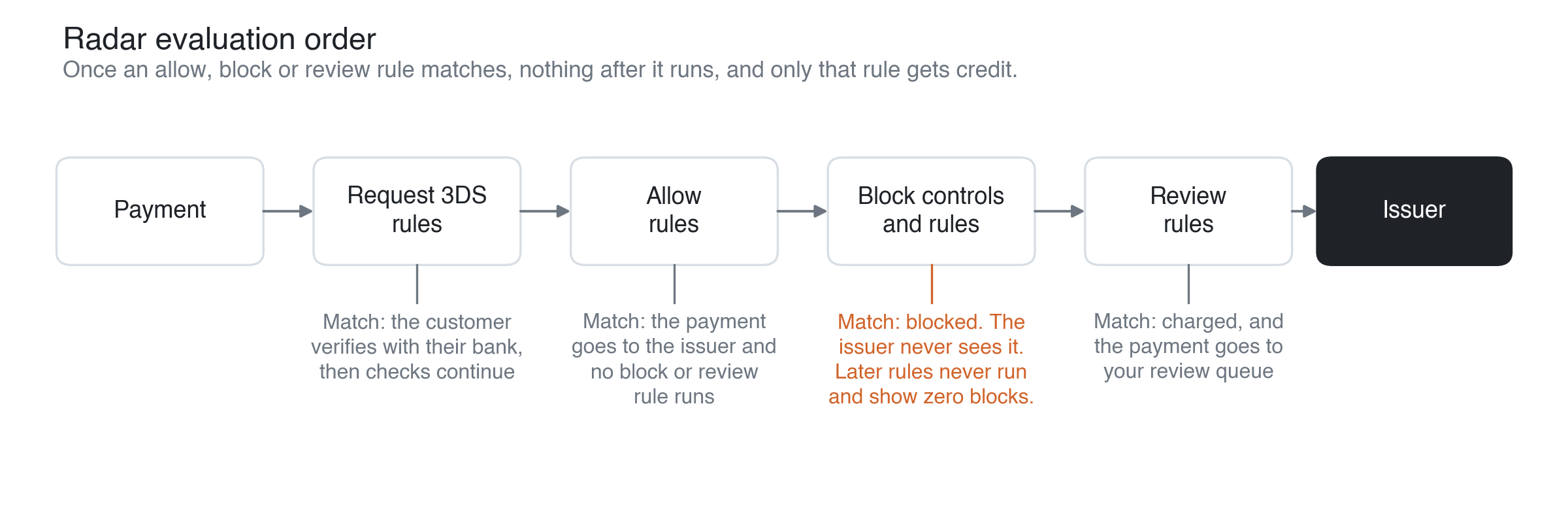
Each rule has a traffic allocation. At 100% the rule acts on every matching payment. At 0% the rule still runs and records what it would have done, but does nothing, which is how you test a rule on live traffic without blocking anyone (Stripe calls this shadow mode). A dashboard shows statistics per rule: how many payments the rule blocked, the dollar volume, an estimated false positive rate, and an estimate of fraud prevented.
Section 4 - Evaluating dispute prevention controls / rules
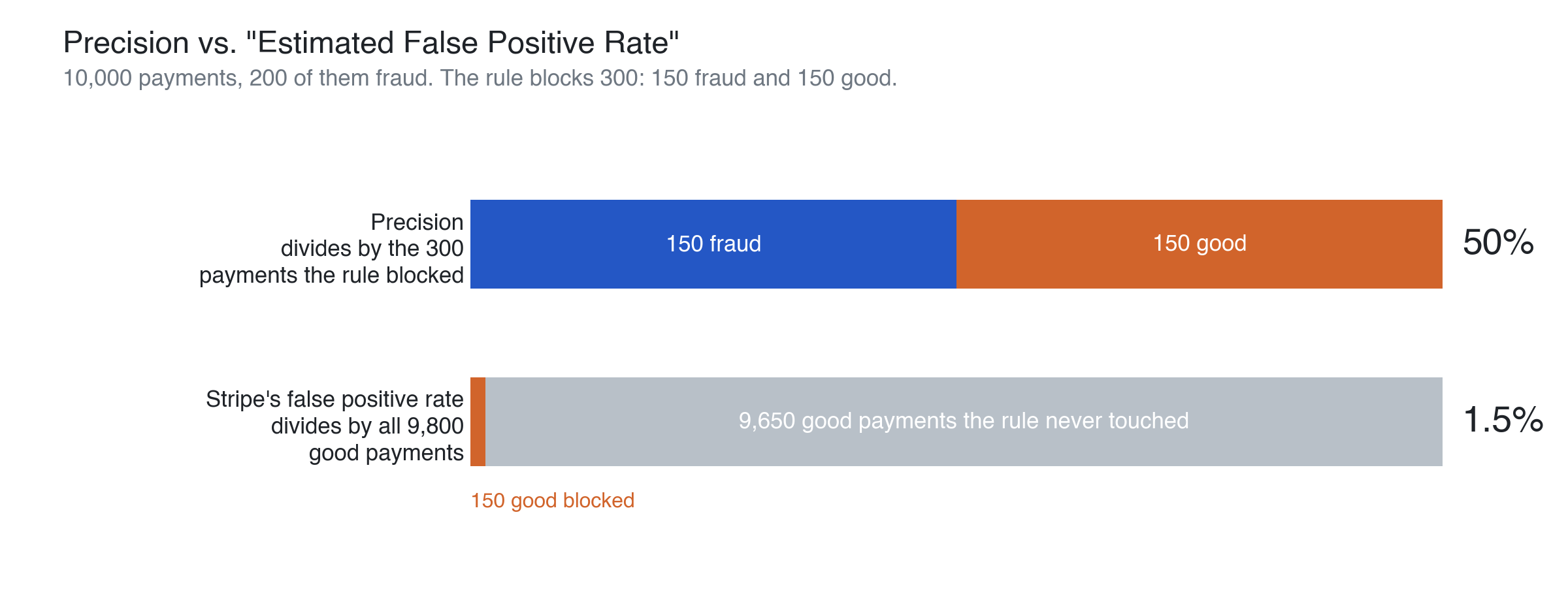
Precision: For each block rule, Stripe shows how many payments the rule blocked and an estimate of how many of those were fraud (“est. fraudulent payments prevented”). A rule’s “precision” is the estimated share of blocks that were fraudulent. This is just the number of fraudulent payments blocked (the second number) divided by the total number of payments the rule blocked (the first number).
Stripe also shows an estimated false positive rate, but that number divides by all of your good payments, so it looks artificially small even when most of a rule’s blocks are good customers. Out of 10,000 payments with 200 fraud, a rule that blocks 150 fraud and 150 good payments shows a 1.5% false positive rate and has 50% precision.
At WalletCo, the fraudulent dispute control showed a 2.24% false positive rate and blocked $32k in two weeks, but its precision was between 45% and 59%, so between 41% and 55% of what it blocked came from good customers. One prepaid/debit rule had 21% precision, so four of every five people it turned away were good customers.
Stripe’s estimate of fraud rates can be significantly off. As companies grow they often configure a ‘holdout’ i.e. they let a percentage of traffic that would have been blocked through (e.g. by setting the traffic allocation for the corresponding rule to 95% instead of 100%). They then measure the real fraud rate in the held out population and use that to obtain a more accurate estimate of a rule’s precision.
Ordering and automatic preset: You can only measure a rule’s precision if the rule gets ‘credit’ for its blocks. Since Radar checks a payment against your controls and rules in a fixed order and stops at the first one that blocks it, only that control gets credit. At WalletCo, the fraudulent dispute control ran before the 14 hand-written rules and blocked most of what they would have matched, so those rules showed zero blocks over four weeks and there was nothing to measure. Three of the rules that did fire were near-copies that blocked prepaid and debit cards above Stripe scores of 20, 25 and 30. The loosest never matched anything, because the other two caught everything it would have. Of the payments the second rule blocked that the first would not have, only 10% were fraud. The control was also on an automatic preset, which means Stripe moves its threshold on its own schedule. If you change a rule on Monday and blocks drop on Thursday, you cannot tell whether your change or Stripe’s caused it. We set the control to a fixed threshold first and only then started on the rules.
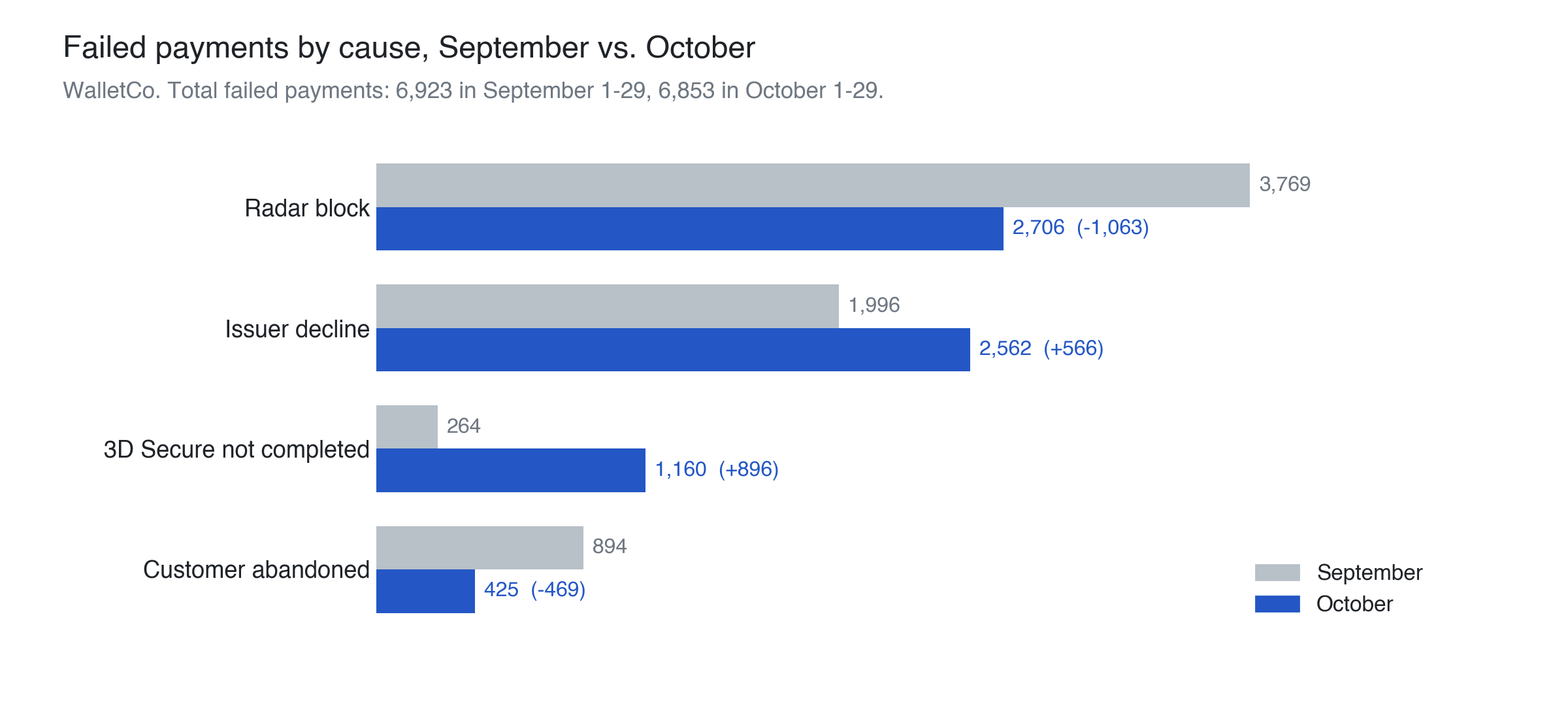
Blocks vs. frictions vs. declines: Replacing a block with a 3D Secure request changes why payments fail more than how many fail. A 3D Secure request sends the customer to their bank to verify the payment. Some of the customers who were being blocked complete it and pay, and the rest still fail, now as a failed 3D Secure check or an issuer decline. At WalletCo, between September and October, Radar blocks fell by 1,063 and abandoned payments fell by 469, while failed 3D Secure checks rose by 896 and issuer declines rose by 566. Total failed payments went from 6,923 to 6,853. After a change like this, watch the 3D Secure completion rate. The drop in blocks alone does not tell you how much revenue you recovered.
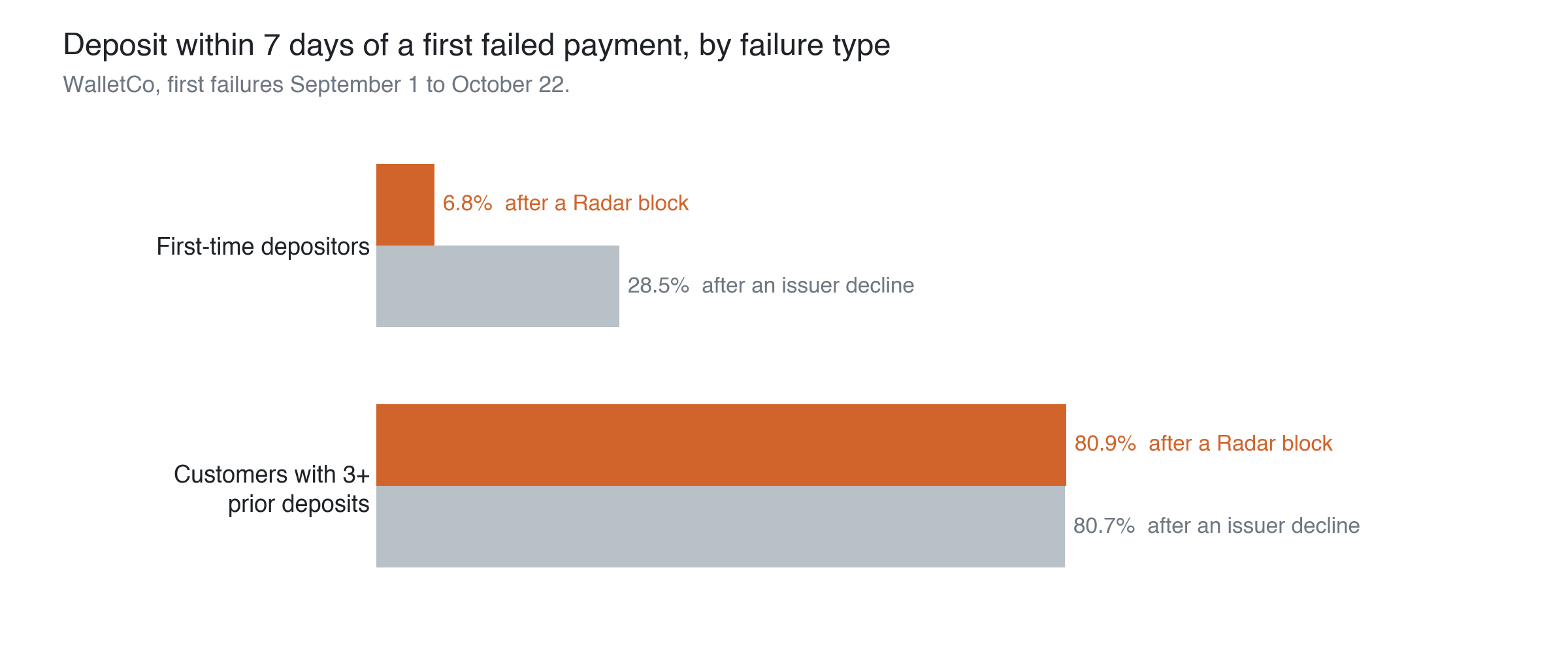
Friction on new customers: The type of failure matters most for new customers. After an issuer decline, the customer knows their bank said no and can call the bank or try another card. After a Radar block, they see a generic decline from you, their bank has no record of the payment, and the same card usually gets blocked again. At WalletCo, 6.8% of first-time depositors whose first failure was a Radar block made a deposit within seven days. After an issuer decline, 28.5% did. Customers with three or more past deposits came back about 81% of the time after either. Radar blocks the riskiest-looking payments, so some of the blocked first-timers were fraudsters who were never coming back. Even so, across 547 blocked first-time depositors, the gap is about 119 lost first deposits.
Precision for 3DS rules: Stripe shows no fraud estimate for 3DS rules, so you have to compute their precision yourself. Before a rule is on, you can run it at 0% traffic allocation and compute the share of matched payments that end in a fraud dispute or an early fraud warning. Once it is on, you can run a holdout (discussed above) on a small percent of traffic and compute the share of held-out payments that result in a dispute or early fraud warning.
With no holdout, you can still get some bounds on precision. The payments that passed 3D Secure and were later reported as fraud can be used to compute the minimum precision. If you add the number of payments that failed 3D Secure and where the customer never paid you can obtain the maximum precision.
A 3DS rule stops only the payments that fail verification, so at the same precision it generally turns away fewer good customers than a block rule and lets more fraud through.
Diagnosing a change in volume: In October WalletCo’s deposits fell 34%, mainly because ~32 large accounts stopped depositing. In September those large depositors had hit many more failed payments than the top accounts that kept depositing. For the median account among the 32, 26% of attempts failed, against 7.6% for the top accounts that stayed. A quarter of the 32 ended September on a failed payment and never deposited again, against 5.5% of the top accounts that stayed. It turned out that the issue was a misconfigured 3DS friction that forced 3DS on all transactions, even low-risk ones. Banks frequently declined the liability shift, even for good users, which led to high payment failure rates and contributed to churn.
Card testing: Repeated attempts by fraudsters inflate rule credit numbers. In card testing, a fraudster with a list of stolen card numbers tries them one after another to find a card that works. Each attempt Radar stops counts as a block and as fraud prevented, so the rule looks effective while the account stays open to try again. At WalletCo, 266 open accounts had five or more failed charges in four weeks. One account tried seven different cards with six billing names and seven ZIP codes, starting 90 seconds after signup. Radar blocked every attempt, and the account was still open three weeks later. Until accounts like these are closed, they are counted in your blocks, your false positive rates and your before/after comparisons. There’s also always a chance one of their attempts eventually succeeds.
Section 5 - Recommendations for Stripe users
- Dispute rate: Compute your dispute rate the way each network does: for Visa, disputes plus early fraud warnings divided by this month’s payments, and for Mastercard, chargebacks divided by last month’s payments. The gap to the network threshold is how much you can loosen your controls. Stay below 0.75%, where Stripe warns you. A rate near zero means you are probably turning away good customers.
- Block precision: Divide each block rule’s estimated fraudulent payments prevented by its blocked payments to get a precision metric. Even at 90% precision, 1 of every 10 customers the rule blocks is a good customer. Define the minimal set of rules that maximizes your profit subject to the network thresholds.
- 3DS precision: Stripe gives no fraud estimate for 3DS rules, so compute a range. The minimum is the challenged payments that passed 3D Secure and were later reported as fraud. The maximum adds the customers who failed 3D Secure and did not pay within seven days. Divide both by the number of payments challenged to get an estimate of precision.
- Fixed threshold: Switch the fraudulent dispute control from the automatic preset to a manual threshold and, on Pro, turn off dynamic risk thresholds. Stripe then stops moving the threshold on its own, so you can better understand the impact of your changes.
- Rule audit: Review every rule frequently, with its precision and its blocks or 3DS requests over the last four weeks. Narrow or remove low-precision block rules and 3DS rules that established customers often fail to complete. Change a 3DS rule to a block if fraud is high among the payments that passed. Move rules with zero matches to shadow mode, and delete them if they still match nothing.
- Daily monitoring: Chart the following daily, split by new and established customers:
- failed payments by cause (Radar block, issuer decline, 3D Secure not completed)
- blocks and 3DS requests per rule
- the 3D Secure completion rate
- your dispute rate.
Configure alerts when one moves sharply from its four-week average, whether the cause is your customers’ behavior or a rule you changed.
- Evaluation order: Radar evaluates 3DS rules first, then allow, then block, then review. Before you add a block rule, check your allow rules, because a matching allow rule skips all block and review rules. Before you replace a block with a 3DS request, check that no other block rule or control matches the same payments, because a payment that passes 3D Secure still runs through them.
- Customer segments: Write separate rules for established and new customers. For established customers, raise the block threshold and cap the amount at first. For new customers, request 3DS instead of blocking, set a per-customer limit, and hold withdrawals or shipment for three to five days. Stripe attributes such as
:seconds_since_card_first_seen:and your own metadata generally will make each of these a one-line rule. - Friction: Consider using friction instead of a block wherever a block rule’s precision is low. A 3DS request, a review, a hold or a per-customer limit lets a good customer still complete the payment, and a block does not. After you replace a block with a 3DS request, compare the 3D Secure completion rate and total failed payments before and after.
- Manual review for large accounts: Every day, list the accounts in your top 100 by volume whose most recent attempt failed, whether from a block, a failed 3D Secure check or an issuer decline, and do a manual review of their account/transaction. Consider contacting them if it was a false positive.
- Fraudster accounts: Close the accounts of identified fraudsters instead of letting rules block them repeatedly. Start with open accounts that have many failed charges in the last month across multiple cards, billing names or ZIP codes. Their attempts inflate your block counts and false positive rates until the account is closed.
- One change at a time: For a given segment of customers, change one rule at a time and log the date, the rule, and its condition before and after. Stripe’s rule activity log only goes back 180 days so it will be useful to have this granular data on your side. To measure a change, compare the same segments over windows of equal length before and after, with banned accounts excluded.
Section 6 - MouseCat
Fraud strategy: Managing rules, precision, and defining a fraud strategy is a lot of work and it’s hard to get right; enterprises have entire fraud strategy teams that do this job. MouseCat takes on a lot of the work that strategy teams do. It reviews your transactions, fraud trends, and metrics to optimize your controls on an ongoing basis. This leads to higher acceptance rates, lower volumes of fraud, and ultimately more revenue. For big companies using MouseCat is a force-multiplier for their existing team and a way to enhance their existing controls. For many smaller companies it means they can avoid hiring a fraud strategy team to begin with.
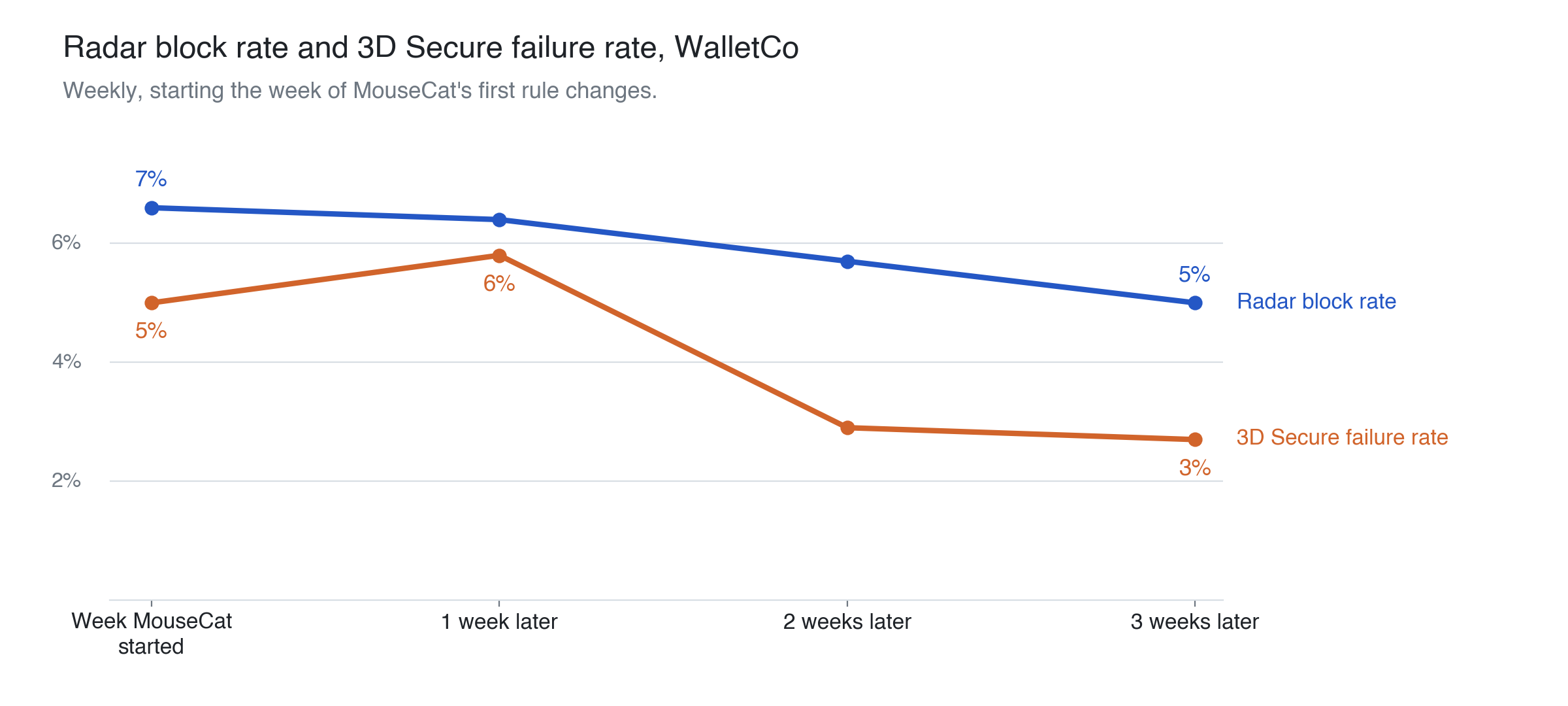
At WalletCo MouseCat set the Fraudulent dispute control to a fixed threshold, raised the score thresholds at which rules block, and changed several block rules to request 3D Secure instead. We backtested each change in Stripe to see how much payment volume it affected. We also corrected the 3DS rule that was forcing 3D Secure on every transaction. Over the next three weeks the 3D Secure failure rate fell from about 6% to about 3%, and the Radar block rate fell from about 7% to 5%.
Transaction review: Even with ideal controls, a set of transactions generally still needs manual review because they are very large, involve a VIP customer, or are particularly anomalous. MouseCat also helps conduct these deeper reviews. Like a foundation model, MouseCat’s models can reason and investigate a case, but unlike a foundation model, MouseCat produces a distribution-calibrated risk probability alongside its reasoning and evidence, enabling companies to make statistically optimal decisions based on these reviews. MouseCat also offers a ‘light’ version of this model that supports real-time decision making.
At WalletCo we run both. The MouseCat real-time model scores each withdrawal request using WalletCo’s account data, including data that WalletCo does not send to Stripe. The investigator reviews the withdrawals the model scores as high risk and reports each flagged account with its evidence and a risk probability. In the first five days of November, MouseCat flagged 19 accounts, all of which WalletCo investigated manually and banned for payment fraud. Stripe had rated every deposit from all 19 accounts as normal risk.
At WalletCo and at companies like Coinbase, MouseCat’s decisions agree with their analysts close to 90% of the time (mousecat.ai/coinbase-case-study).
Adversariality of fraud: The toughest thing about fraud fighting is that fraudsters are constantly adapting to evade defenses you put in place. This creates ongoing work for teams even when they have already achieved ‘optimal’ controls. MouseCat has built a proprietary system called EMOO (evolutionary multi-objective optimization) that automatically tunes the models, agents, and rules in the system when labels like disputes arrive. At one of our Fortune 500 customers we recently deployed a new version of MouseCat entirely optimized by EMOO that achieved 10% better precision than our manual attempt at the same optimization. At WalletCo we run EMOO on a regular basis to ensure the system remains current as fraudsters adapt.
People in the loop: Sometimes you still need to have people involved in making fraud decisions. MouseCat has a team of forward deployed engineers, researchers, and analysts that work directly with your team and take on ownership of ongoing fraud management concerns where you want them to. At WalletCo we have dedicated MouseCat POCs that manage fraud concerns.
If you’re interested in a MouseCat audit of your current controls, get in touch.